Salesforce Data Cloud
Ingest customer data into Salesforce Data Cloud for unified profiles, segmentation, and activation. Stream records into Data Cloud data streams, update unified profiles, manage segments, and trigger activations.
Prerequisites
- A Salesforce org with Data Cloud provisioned and enabled
- A Connected App with the required Data Cloud OAuth scopes
- Access to the Data Cloud Setup to create ingestion data streams
Authentication
Salesforce Data Cloud supports two authentication methods:
OAuth 2.0 (Recommended)
- SignalSmith initiates a secure OAuth flow with your Salesforce org
- Authorize SignalSmith to access Data Cloud APIs
- SignalSmith automatically manages token refresh
Client Credentials (Server-to-Server)
- In Salesforce, navigate to Setup > App Manager
- Create a new Connected App with Enable OAuth Settings checked
- Add the required scopes:
apicdp_ingest_apicdp_profile_apicdp_query_apicdp_segment_apirefresh_tokenoffline_access
- Enable Client Credentials Flow
- Copy the Client ID and Client Secret
- Enter them in SignalSmith when creating the destination
Configuration
| Field | Type | Required | Description |
|---|---|---|---|
| Instance URL | Text | Yes | Your Salesforce instance URL (e.g., https://myorg.my.salesforce.com). Auto-populated when using OAuth. |
| API Version | Select | Yes | Salesforce API version. Default: v59.0 |
| Data Space | Text | No | The Data Cloud data space to operate in. Default: default |
Target Settings
| Field | Type | Required | Description |
|---|---|---|---|
| Object Type | Select | Yes | The type of Data Cloud object to sync to: Data Stream, Unified Profile, Activation Target, or Segment |
| Data Stream Name | Text | Conditional | API name of the ingestion data stream (required for Data Stream). Example: MyDataStream__dlm |
| Source Object Name | Text | Conditional | Source object name within the data stream (required for Data Stream). Example: MySourceObject__c |
| Profile API Name | Text | Conditional | Unified profile object API name (required for Unified Profile). Default: UnifiedIndividual__dlm |
| Activation Target ID | Text | Conditional | The activation target identifier (required for Activation Target) |
| Segment Name | Text | Conditional | The segment API name or ID (required for Segment) |
| Ingestion Mode | Select | No | Sync (waits for confirmation) or Async (returns immediately). Default: Sync. Only applies to Data Stream. |
Supported Operations
Sync Modes
| Mode | Supported |
|---|---|
| Upsert | Yes |
| Insert | Yes |
| Update | Yes |
| Mirror | — |
Audience Sync Modes
| Mode | Supported |
|---|---|
| Add | Yes |
| Remove | Yes |
| Mirror | Yes |
| Upsert | Yes |
Features
- Field Mapping: Yes
- Schema Introspection: Yes — SignalSmith reads field definitions from Data Streams and Unified Profiles
Required Mapping Fields
| Object Type | Required Fields |
|---|---|
| Data Stream | maid__c (Record ID / Primary Key) |
| Unified Profile | IndividualId__c (Individual ID) |
Default Destination Fields
Data Stream
maid__c, FirstName__c, LastName__c, Email__c, Phone__c, City__c, State__c, Country__c, PostalCode__c, Company__c, CreatedDate__c, ModifiedDate__c
Unified Profile
IndividualId__c, FirstName, LastName, Email, Phone
Segment
IndividualId__c, SegmentMembershipStatus
Activation Target
IndividualId__c, ActivationStatus
How It Works
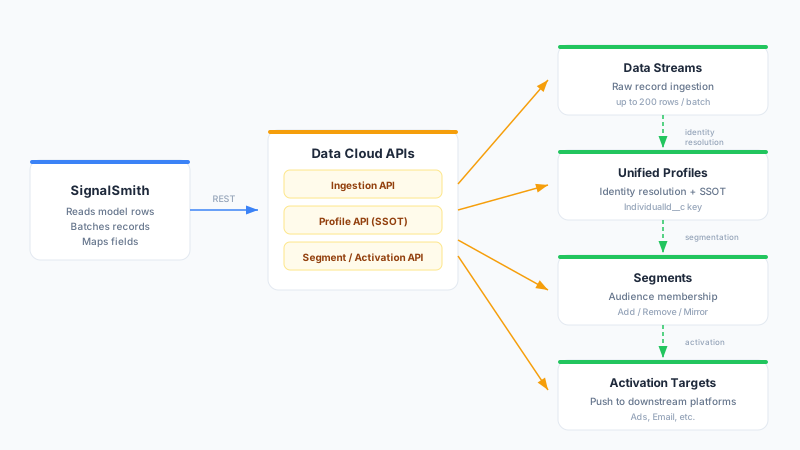
Data Streams (Ingestion API)
Data Streams are the primary ingestion mechanism for Data Cloud. SignalSmith pushes records in batches of up to 200 rows (max 10 MB per request) into your configured data stream. Data Cloud then processes, deduplicates, and unifies these records according to your identity resolution rules.
Important: Data streams must be created in the Salesforce Data Cloud Setup before syncing. SignalSmith validates the data stream exists before the first sync.
Unified Profiles
Update individual unified profile records directly. Each row maps to a profile update using the Individual ID as the key. This is best for targeted updates to specific profile attributes.
Segments
Add or remove individuals from Data Cloud segments. SignalSmith maps each row to a segment membership operation using the Individual ID.
Activation Targets
Trigger activations to push segments to downstream platforms (advertising, email, etc.). This publishes your Data Cloud segments to connected activation destinations.
Setting Up a Data Stream
Before syncing, you must create a data stream in Data Cloud:
- In Salesforce, navigate to Data Cloud Setup > Data Streams
- Click New and select Ingestion API as the source
- Define the schema (fields) for your data stream
- Note the Data Stream API Name (ends in
__dlm) and Source Object Name (ends in__c) - Use these values when configuring the destination in SignalSmith
Rate Limits
- Ingestion API: 200 records per call, 10 MB payload limit
- Composite API (Profiles): 25 sub-requests per call
- Segment API: 200 member operations per call
- SignalSmith handles rate limiting, payload splitting, and automatic retries
Troubleshooting
Data stream not found
Ensure the Data Stream API Name matches exactly (including the __dlm suffix). Data streams must be created in Data Cloud Setup > Data Streams before syncing.
Authentication failed
For OAuth: Re-authorize the connection from the destination settings page. For Client Credentials: verify the Connected App has the required CDP scopes and that Client Credentials Flow is enabled.
Insufficient CDP scopes
The Connected App must include Data Cloud-specific scopes (cdp_ingest_api, cdp_profile_api, etc.). Add these in Setup > App Manager > Your Connected App > OAuth Scopes.
Payload too large
Data Cloud enforces a 10 MB limit per ingestion request. SignalSmith automatically splits large batches, but if individual rows contain very large JSON fields, consider reducing the number of mapped columns.
Records rejected by Data Cloud
Check the sync run details for per-record error messages. Common causes include schema mismatches (wrong field names or types) and missing required fields in the data stream definition.