Journeys
Journeys are multi-step, multi-channel customer workflows that orchestrate personalized experiences across your entire customer lifecycle. Using a visual canvas editor, you design the path customers take — from entry triggers through wait steps, branching logic, and destination actions — all executed automatically at scale.
Why Journeys?
Traditional campaign tools force you to set up disconnected, one-shot sends. Journeys let you think in terms of customer experiences rather than individual messages:
- Multi-step orchestration — Chain actions across days, weeks, or months based on customer behavior
- Multi-channel activation — Combine email, SMS, push notifications, ad audiences, webhooks, and profile updates in a single flow
- Dynamic branching — Route customers through different paths based on traits, events, or random splits
- Real-time responsiveness — React to customer actions as they happen with event-based triggers and wait conditions
- Visual design — Build and understand complex workflows through an intuitive drag-and-drop canvas
How Journeys Work
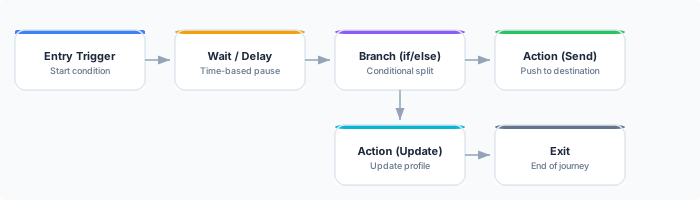
- Customers enter the journey when they match entry criteria — joining an audience, triggering an event, or being manually added
- The journey engine moves each customer through the canvas tile by tile, respecting wait durations and evaluating branch conditions
- Actions execute at each action tile — sending to a destination, updating a profile, or calling a webhook
- Customers exit when they reach an exit tile, meet exit criteria, or are manually removed
Journey Canvas
The journey canvas is a visual editor where you design your workflow by placing and connecting tiles. Each tile represents a step in the customer journey:
| Tile Type | Purpose | Example |
|---|---|---|
| Entry | Define who enters the journey | ”Users who join the High-Value Customers audience” |
| Wait | Pause before the next step | ”Wait 3 days” or “Wait until user opens email” |
| Branch | Split into different paths | ”If lifetime value > $500, go left; otherwise go right” |
| Action | Send to a destination | ”Send welcome email via Braze” |
| Update Profile | Modify customer traits | ”Set onboarding_stage = ‘completed‘“ |
| Webhook | Call an external API | ”POST to internal reward service” |
| Sub-Journey | Link to another journey | ”Enter the re-engagement journey” |
| Exit | Remove from journey | ”Journey complete” |
Tiles are connected by edges that define the flow direction. A journey must have exactly one Entry tile and at least one Exit tile.
Journey States
A journey progresses through a defined set of states:
| State | Description |
|---|---|
| Draft | Journey is being designed on the canvas. No customers are processed. |
| Active | Journey is live. New customers enter based on triggers, and the engine processes them through tiles. |
| Paused | Journey is temporarily stopped. No new customers enter, and active members are held at their current tile. |
| Completed | Journey has been archived. No new entries. Existing members may still be processed to exit. |
Key Capabilities
Entry Flexibility
Journeys support multiple entry mechanisms to cover every use case:
- Audience-based entry — Customers enter when they join a specified audience
- Event-based entry — Customers enter when they perform a specific action (e.g., “signed_up”, “cart_abandoned”)
- Manual entry — Upload a list of customer IDs or trigger entry via the API
Branching Logic
Control the customer path with conditional logic:
- Condition branches — Evaluate trait values, event properties, or audience membership to route customers
- Percentage splits — Randomly divide customers for A/B testing (e.g., 80/20 split)
- Time-based branches — Route based on time of day, day of week, or relative timing
Execution Monitoring
Track journey performance in real time:
- Active members count — How many customers are currently in the journey
- Per-tile analytics — How many customers have passed through each tile, with conversion rates
- Error tracking — Monitor failed actions with retry status and error details
- Pause/resume controls — Safely pause a journey without losing state
API Reference
Journeys are managed through the SignalSmith REST API:
# List all journeys
GET /api/v1/journeys

# Get a journey with its canvas definition
GET /api/v1/journeys/{id}

# Create a journey
POST /api/v1/journeys

# Update a journey (draft only)
PUT /api/v1/journeys/{id}

# Activate a journey
POST /api/v1/journeys/{id}/activate

# Pause a journey
POST /api/v1/journeys/{id}/pause

# Resume a paused journey
POST /api/v1/journeys/{id}/resume

# Delete a journey (draft only)
DELETE /api/v1/journeys/{id}
See the API Reference for full request/response schemas.
Best Practices
- Start simple — Begin with a linear journey (entry, wait, action, exit) before adding branches. Validate the core flow before adding complexity.
- Set exit criteria — Always define conditions under which customers should leave the journey early (e.g., they convert, they unsubscribe, or they’ve been in the journey too long).
- Use sub-journeys for reuse — If you find yourself duplicating tile sequences across journeys, extract them into a sub-journey.
- Test with a small audience — Create a test audience with known members and run them through the journey before activating with your full audience.
- Monitor after launch — Check the execution dashboard within the first hour of activation to catch configuration issues early.
Next Steps
- Create your first journey — Step-by-step guide to building and activating a journey
- Tile types reference — Detailed documentation for all 8 tile types
- Branching logic — Deep dive into condition branches, percentage splits, and time-based routing
- Execution & monitoring — Track journey performance and troubleshoot issues