Audience Boost
Audience Boost enriches your audience sync data with third-party identity graph identifiers to increase ad platform match rates. When enabled on an audience sync, it resolves your first-party identifiers (emails, phones, device IDs) against an identity graph and appends additional identifiers that the destination platform can match on.
Why Match Rates Matter
When you sync an audience to an ad platform like Meta, Google, or TikTok, the platform tries to match each row in your audience against its own user database using the identifiers you provide. If a user’s email in your data doesn’t match the email they used on the platform, that user goes unmatched — and your campaign reaches fewer people than intended.
Typical first-party match rates range from 30-60%, meaning up to 70% of your audience may go unmatched. Audience Boost closes this gap by resolving additional identifiers from an identity graph, giving the platform more signals to match on.
How Dual Audiences Work
When Audience Boost is enabled, a single audience sync creates two audiences on the destination platform:
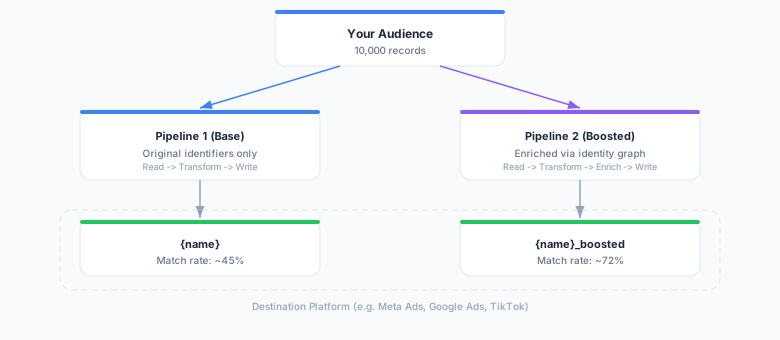
- Base audience (
{name}) — synced with your original identifiers only, serving as a baseline - Boosted audience (
{name}_boosted) — synced with enriched identifiers from the identity graph
This dual-audience approach lets you directly compare match rates and audience reach between the two, so you can measure the exact uplift that enrichment provides.
Identifier Flow
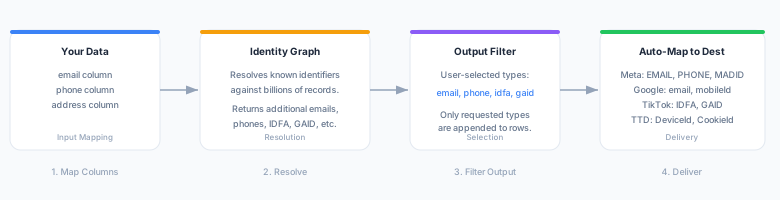
The enrichment process has four stages: mapping your source columns, resolving against the identity graph, filtering to your selected output types, and auto-mapping to destination-specific field names.
Configuring Input Identifier Mapping
The identifier mapping tells Audience Boost which columns in your source model contain identifiable information and what type of identifier they represent.
| Source Column | Identifier Type | Description |
|---|---|---|
email | email | Email addresses (hashed or plaintext) |
phone | phone | Phone numbers |
address | address | Physical/mailing addresses |
Map each relevant column in your source model to its identifier type. The identity graph uses these mappings to look up matching records and resolve additional identifiers.
Example
If your source model has columns user_email and user_phone, you would configure:
[
  {"source_column": "user_email", "identifier_type": "email"},
  {"source_column": "user_phone", "identifier_type": "phone"}
]
Selecting Output Identifier Types
Output identifiers control which enriched identifier types are included in the boosted audience. Available types depend on the destination platform:
| Type | Label | Platforms |
|---|---|---|
email | Email Address | All ad platforms |
phone | Phone Number | All ad platforms |
idfa | IDFA (Apple iOS) | Meta, Google, TikTok, Snapchat, TTD, Amazon |
gaid | GAID (Google Android) | Meta, Google, TikTok, Snapchat, TTD, Amazon |
rida | RIDA (Roku) | CTV platforms |
ttd_cookie | TTD Cookie | The Trade Desk |
liveramp_cookie | LiveRamp Cookie | LiveRamp-integrated platforms |
Only output types supported by your destination are shown in the configuration UI. Enriched identifiers are automatically mapped to destination-specific field names — for example, idfa maps to MADID for Meta and mobileId for Google.
Supported Destinations
Audience Boost is available for the following ad platforms:
| Platform | Supported Identifiers |
|---|---|
| Meta Ads | email, phone, IDFA, GAID |
| Google Ads | email, phone, IDFA, GAID |
| Google Ad Manager | email, phone |
| TikTok Ads | email, phone, IDFA, GAID |
| LinkedIn Ads | email, phone |
| Snapchat Ads | email, phone, IDFA, GAID |
| The Trade Desk | email, phone, IDFA, GAID, TTD cookie |
| Amazon Ads | email, phone, IDFA, GAID |
| Facebook Ads | email, phone |
| Criteo | email, phone |
| Pinterest Ads | email, phone |
| Yahoo DSP | email, phone |
| Microsoft Ads | email, phone |
| X Ads | email, phone |
| Amazon DSP | email, phone |
Understanding Per-Identifier-Type Metrics
After a boosted sync run completes, the sync run details show per-identifier-type metrics that break down exactly where the uplift comes from:
| Metric | Description |
|---|---|
| Identifier Counts | Unique counts per identifier type for both base and boosted audiences |
| Total Base | Total unique identifiers in the base audience |
| Total Enriched | Total unique identifiers in the boosted audience |
| Match Delta | Percentage improvement in total identifiers (e.g., +34.5%) |
| Duration | Time spent on the enrichment step |
Example breakdown:
| Identifier Type | Base | Boosted | Uplift |
|---|---|---|---|
| 10,000 | 12,500 | +25.0% | |
| Phone | 3,000 | 8,200 | +173.3% |
| IDFA | 0 | 4,100 | new |
| GAID | 0 | 3,800 | new |
| Total | 13,000 | 28,600 | +120.0% |
These metrics help you understand which identifier types contribute the most uplift and whether Audience Boost is delivering value for a given audience and destination combination.
Privacy and Data Handling
Audience Boost is designed with privacy as a core constraint:
- No PII storage — Enrichment happens in-flight during sync execution only. No enriched identifiers are stored on SignalSmith infrastructure.
- Provider isolation — The identity graph provider receives only the identifier types you configure in the input mapping. It does not receive your full audience data.
- Fail-open by default — If the identity graph provider is unavailable or returns an error, the sync continues with the base audience only (configurable via
fail_open). - Audit trail — All boost-related metrics are recorded on the sync run record, providing a complete audit trail of enrichment activity.
- Dual audience transparency — Both base and boosted audiences are visible on the destination platform, so you always know exactly what data was sent.